
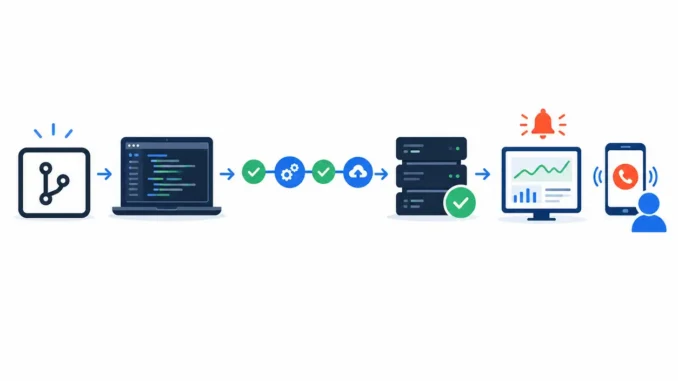
A dedicated development team should not receive production deployment rights because its first release passed CI. That test says little about who built the image, which identity deployed it, or whether an operator can reverse it. I would start with one backend service and make its path from commit to rollback reproducible before allowing the team to ship without a platform engineer beside them.
A working setup starts with one service and a bounded deployment identity
Pick an API with a container build, a Kubernetes Deployment, and an endpoint that can report readiness without querying a dependency that the API does not need to serve traffic. Avoid starting with the entire platform: a failure across several services gives you too many possible causes for the first deployment drill. Record the repository, production namespace, image registry, service owner, and current deployment command in a short runbook. If nobody can name the last command, retrieve it from CI history before changing access.
Use Tech Leads Face Backend Security and Privacy Debt to seed an inventory of inherited risks, then check each candidate against this service. Look specifically for database credentials in CI variables, images referenced by mutable tags, broad Kubernetes roles, and request logs containing personal data. The inventory is useful here only if each confirmed finding gets an owner and a check that can fail a deployment.
In a sandbox, create a namespace such as team-staging and a separate team-production namespace. Have the platform owner create a Kubernetes Role that permits the deployment job to get, patch, and update the named Deployment and to read its rollout status. Bind that Role to the deployment identity; do not hand the team cluster-admin. Kubernetes RBAC is namespace-aware, so this boundary limits the damage from a mistaken command, although it does not replace controls on what the resulting pod can access.
Give the application its own runtime identity. On Amazon EKS, EKS Pod Identity can connect a Kubernetes service account to an AWS IAM role used by the running API; the GitHub Actions deployment role should be a different role. That separation matters because a compromised container should not inherit permission to change its own Deployment. Put application credentials in AWS Secrets Manager and arrange their delivery through a reviewed mechanism such as External Secrets Operator. Do not copy a production secret into a CI variable merely to make a smoke test pass: CI logs and job environments would create another place to protect and rotate it.
Set an initial requirement of two production reviewers in the GitHub environment; treat that count as a setting to revisit when it blocks an incident response. Give at least one reviewer responsibility for the service and one for the platform. A reviewer should approve a specific image digest and deployment run, not a vague request for “the latest build.”
Short-lived identity beats a stored deployment key for this pipeline
Configure GitHub Actions OpenID Connect with an AWS IAM OIDC provider, then create an IAM role whose trust policy requires the expected audience and the subject for repo:ORG/REPO:environment:production. In the workflow, request id-token: write, use aws-actions/configure-aws-credentials, and select the production GitHub environment on the deployment job. GitHub’s environment approval happens before that job runs; the IAM subject condition then prevents a job outside that environment from assuming the production role. Test the condition with an unapproved branch and confirm that role assumption fails.
GitHub OIDC with AWS STS wins when the deployment job runs on a network that can reach both services, because there is no long-lived AWS access key to store or rotate. Its cost is trust-policy maintenance: a repository or environment rename can break a legitimate release. A stored AWS access key can be a temporary choice for an isolated runner that cannot use OIDC, but it costs you key rotation, exposure monitoring, and an emergency revocation procedure. I would not make the stored key the normal path while OIDC is available, because a leaked long-lived credential remains usable after the CI job ends.
AWS publishes 900 seconds as the minimum requested duration for an STS role session. Use the shortest permitted session that accommodates your deployment and rollback command, and measure job duration before tightening it further. The session limit reduces the useful lifetime of stolen credentials; it does not make an overprivileged IAM policy safe. Scope the role to the cluster access it needs, and map it through an EKS access entry to the intended Kubernetes permissions rather than granting broad access through an old shared administrator identity.
Keep source control permissions separate too. Developers may open pull requests, but protect the release branch with required review and passing checks. A workflow change is a change to the deployment mechanism, so require review from the team that owns that mechanism. Pin third-party GitHub Actions to commit SHAs in the final workflow; a tag such as @v4 is convenient during bootstrap but can move independently of your repository. Record the approved SHAs in the same change as the workflow so the next maintainer can update them deliberately.
The build should produce evidence the deploy job can check
Make CI build the container once and pass its registry digest to later jobs. For a Node.js API, start with npm ci against a committed lockfile, run unit tests, and build the Docker image from a versioned Dockerfile. Run Gitleaks against the repository before publishing an image, then scan the published digest with Trivy using –exit-code 1 –severity HIGH,CRITICAL. That threshold is a starting policy, not proof of safety: a scanner cannot identify a missing authorization check, and an unfixed finding may need a documented exception rather than a silent suppression.
Generate an SPDX 2.3 software bill of materials with Syft and attach it to the same image digest. Sign the digest with Cosign’s keyless flow using the GitHub OIDC identity. In the deployment job, verify the signature’s certificate issuer and expected workflow identity before updating Kubernetes. Digest pinning answers “which bytes?”; identity verification answers “which workflow produced them?” Neither answer establishes that the API handles private data correctly, so retain tests for authorization and log redaction alongside the supply-chain checks.
Use Can DevOps prove your dedicated team is production-safe as a challenge to the release record: an operator should be able to retrieve the commit, test result, scan result, signed digest, approver, and deployed revision for the same run. Store the run URL and digest with the deployment annotation or release record. If those identifiers disagree, stop the deployment rather than trying to reconcile them after an incident.
Before production, deploy that digest to team-staging and run a smoke test from an identity with access to the staging cluster. The following Bash snippet assumes a Deployment and Service both named api, with the Service exposing port 8080 and the API serving /ready. It checks rollout, rejects a tag-only image reference, and tests the endpoint through kubectl port-forward:
set -euo pipefail
ns=team-staging
kubectl -n "$ns" rollout status deployment/api --timeout=180s
image=$(kubectl -n "$ns" get deployment api -o jsonpath='{.spec.template.spec.containers[0].image}')
case "$image" in *@sha256:*) ;; *) echo "image is not digest-pinned" >&2; exit 1;; esac
kubectl -n "$ns" port-forward service/api 18080:8080 >/tmp/api-port-forward.log 2>&1 &
pf=$!
trap 'kill "$pf" 2>/dev/null || true' EXIT
for i in {1..20}; do
  if curl --fail --silent http://127.0.0.1:18080/ready; then exit 0; fi
  sleep 1
done
exit 1
The 180-second rollout timeout is a value to tune against this service’s measured startup time, not a universal Kubernetes setting. The loop’s 20 attempts are likewise a local retry allowance; they give port-forward a moment to start without turning a failed readiness check into an indefinite job. Keep the test in the release repository so the dedicated team and on-call engineer run the same command.
Promotion is credible only after a rollback drill
Promote the verified digest, not a rebuilt image, to production. Set the Deployment strategy to RollingUpdate with maxUnavailable: 0 and maxSurge: 1 for the first trial if the cluster has capacity for an extra pod. This favors availability during replacement, at the cost of temporary compute and potentially overlapping old and new versions. Check database migrations for backward compatibility before using that strategy: old and new pods may serve requests at the same time.
Use a Kubernetes readiness probe on /ready and a separate liveness probe that does not restart healthy pods just because a downstream dependency is slow. Watch the new revision in Prometheus and compare its request error rate and latency with the previous revision; make sure the metrics carry a revision or image label, or an aggregate can hide a bad rollout. As an initial alert to calibrate, investigate a 1% server-error rate over five minutes when traffic is sufficient to make that sample meaningful. A low-traffic API needs request counts and manual checks alongside a percentage.
Run the first production release with the platform engineer present. Save the prior image digest, deploy the new one, verify the rollout, and then deliberately restore the prior digest in a planned drill. Record the elapsed time from the rollback command to a ready prior revision; that is an observed result for your service, unlike a target copied from another team. Aim initially to complete that drill within 10 minutes, adjusting the target after measuring image-pull and startup behavior. If the workflow continuously reapplies the new digest, fix that reconciliation path before relying on a manual kubectl rollout undo: otherwise automation can redeploy the failure you just reversed.
Keep the deployment job’s logs, approval record, and Kubernetes events long enough to investigate a delayed report. Start with a 30-day retention setting and change it to meet your organization’s incident and privacy requirements. Limit log fields and access rather than retaining request bodies “for debugging”; retaining less sensitive data reduces what an operator must search, protect, and eventually delete.
The first handoff should be a failed deployment drill
Before granting unattended production releases, ask the dedicated team to submit a staging image referenced only by a mutable tag. The digest check should fail, and the team should be able to show where it failed, who can fix it, and how to retry with a verified digest. If that exercise requires an undocumented platform command, keep the release supervised and repair the runbook first.